

Building Information Modeling (BIM) software has transformed how natural stone projects move from concept to installation, enabling architects and fabricators to visualize complex assemblies, detect clashes before construction begins, and coordinate multi-trade installations with millimeter precision. This digital approach replaces traditional 2D drawings with intelligent 3D models that contain detailed information about each stone element—from material specifications and finish types to installation sequences and structural connections.
The stone industry faces unique challenges that make BIM particularly valuable: heavy materials requiring precise structural coordination, complex joinery between dissimilar materials, and the need to communicate intricate details across multiple stakeholders. When a limestone cladding system intersects with curtain wall systems, HVAC penetrations, and waterproofing layers, BIM software allows teams to identify and resolve conflicts in the digital environment rather than discovering costly errors on-site.
Modern BIM platforms designed for stone work range from industry-standard tools like Revit and ArchiCAD to specialized applications that handle stone-specific requirements such as parametric panel layouts, joint detailing, and fabrication data extraction. These systems generate construction documents, shop drawings, and CNC machine files directly from the 3D model, reducing errors and accelerating project timelines by 20-30% according to industry studies.
Understanding which BIM solution fits your workflow, how to implement it effectively within your organization, and what results to expect requires examining both software capabilities and real-world applications across residential, commercial, and restoration projects.
What Is BIM Modeling Software for Natural Stone?
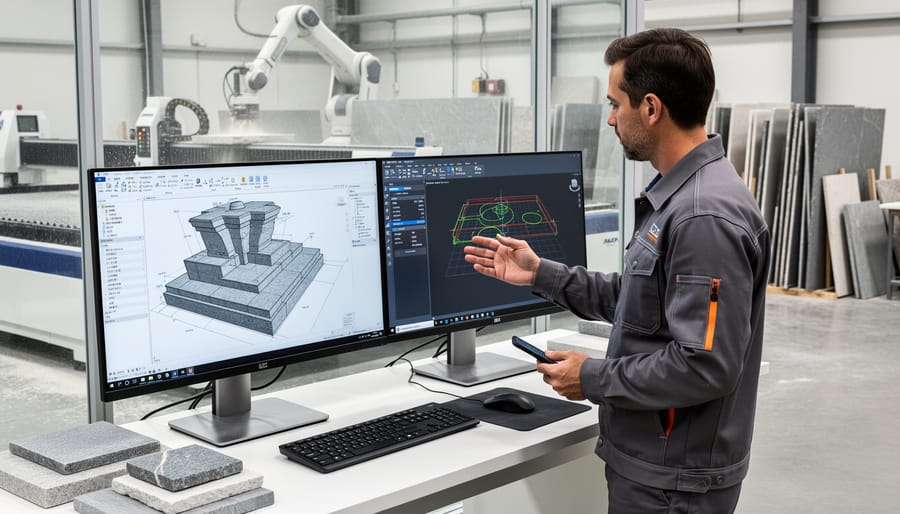
The Core Components of Stone-Specific BIM
Stone-specific BIM software incorporates specialized features that address the unique requirements of natural stone projects, from quarry selection through final installation. Understanding these core components helps professionals leverage technology effectively for superior project outcomes.
3D visualization forms the foundation of stone-oriented BIM platforms. These tools create detailed digital representations of stone assemblies, allowing teams to examine veining patterns, color variations, and surface finishes before fabrication begins. This visualization capability proves invaluable when coordinating stone cladding with structural elements or ensuring proper alignment of book-matched marble panels across building facades.
Comprehensive material databases distinguish stone-focused BIM software from generic platforms. These libraries contain accurate specifications for various stone types, including dimensional tolerances, weight loads, thermal properties, and moisture absorption rates. Access to this data enables precise calculations for structural support requirements and helps identify potential installation challenges during the design phase rather than on-site.
Parametric modeling capabilities allow designers to establish intelligent relationships between stone elements. When adjusting panel dimensions or modifying corner details, the software automatically updates connected components, maintaining design integrity while reducing manual revision time. This feature particularly benefits projects with repetitive stone patterns or complex curved surfaces.
Coordination tools facilitate seamless collaboration between architects, fabricators, and installers. Cloud-based platforms enable real-time updates to stone shop drawings, ensuring all stakeholders work from current information. Clash detection features identify conflicts between stone assemblies and mechanical systems before fabrication, preventing costly field modifications and project delays.
How BIM Differs from Traditional Stone Templating
Traditional stone templating relies on physical measurements taken at the job site using hand tools, paper templates, or laser measuring devices. A fabricator visits the installation location, manually records dimensions, transfers these measurements to the shop floor, and creates cutting patterns for slabs. This process, while time-tested, introduces multiple opportunities for human error during measurement transfer and interpretation. Each handoff between site measurement and fabrication increases the risk of dimensional inaccuracies, leading to costly remakes and project delays.
BIM modeling software transforms this workflow by creating a single, coordinated digital model that eliminates redundant measuring steps. Rather than relying on field measurements alone, BIM integrates architectural plans, structural elements, and stone components into one comprehensive 3D environment. Digital scans and precise measurements feed directly into the model, which then generates exact fabrication drawings and CNC machine files without manual transcription. This direct digital transfer reduces errors by up to 90% compared to traditional methods.
The efficiency gains extend beyond accuracy. Traditional templating requires multiple site visits, physical template storage, and time-consuming manual calculations. BIM workflows enable virtual templating, allowing fabricators to begin preliminary work before physical access to the site. Design changes update automatically throughout the model, instantly reflecting modifications in all related drawings and schedules. This real-time coordination compresses project timelines significantly, with many fabricators reporting 30-40% faster turnaround times from template to installation. The result is a more predictable, cost-effective process that benefits everyone from architects to end clients.
Leading BIM Software Platforms for Stone Assemblies
Revit for Stone Projects
Autodesk Revit stands as the industry standard for architectural BIM, offering robust capabilities for stone project modeling. The software excels at creating detailed representations of stone cladding systems, custom countertops, and decorative architectural elements with precision that traditional CAD cannot match.
For stone applications, Revit’s parametric modeling approach allows designers to create intelligent stone components that automatically adjust to design changes. When modeling exterior stone cladding, users can define panel sizes, joint spacing, and anchoring systems that update throughout the entire building facade. This functionality proves invaluable when coordinating stone installations with structural supports, waterproofing layers, and mechanical systems.
The software’s material library includes stone-specific properties such as weight, thermal characteristics, and finish options. These parameters help architects calculate accurate loads for structural engineering and generate precise material quantities for estimating. Stone fabricators particularly benefit from Revit’s ability to export shop drawings and CNC fabrication files directly from the model.
Several plugins enhance Revit’s stone-specific workflows. Extensions like Revit Rock provide specialized tools for natural stone detailing, automating tasks such as panel layout optimization and joint pattern generation. Other add-ins focus on material takeoffs, allowing fabricators to extract cut lists and installation sequences directly from the model.
Revit’s collaboration features enable seamless coordination between architects, stone suppliers, and installers. The software’s cloud-based sharing capabilities mean all project stakeholders work from a single, updated model, reducing errors and costly field modifications. This integrated approach streamlines everything from initial design concepts through final installation documentation.
ArchiCAD and Natural Stone Design
ArchiCAD stands out as an intuitive BIM platform particularly well-suited for architects working with natural stone applications. The software’s parametric design capabilities allow users to create highly detailed 3D models of stone assemblies, from intricate facades to custom interior installations. Its object-based modeling approach enables designers to assign specific material properties to stone elements, including texture, weight, and thermal characteristics, which proves invaluable during the planning stages.
What makes ArchiCAD especially appealing for stone projects is its user-friendly interface that doesn’t sacrifice sophistication for accessibility. The software’s visualization tools produce photorealistic renderings that help clients envision how different stone types will appear in the finished space. Architects can experiment with various stone patterns, joint configurations, and installation methods while the system automatically updates technical drawings and specifications.
The platform’s collaboration features facilitate seamless communication between designers, stone fabricators, and contractors. ArchiCAD’s open BIM approach supports IFC file exchange, ensuring that detailed stone specifications and installation requirements transfer accurately across different software platforms. This interoperability reduces errors and streamlines the fabrication process, particularly valuable when working with high-value natural stone materials where precision is paramount.
Specialized Stone Fabrication Software
While comprehensive BIM platforms serve broader construction needs, specialized stone fabrication software addresses the unique requirements of stone shops and fabricators. These purpose-built solutions streamline operations from templating to installation while offering varying degrees of BIM integration.
Moraware stands as one of the most widely adopted platforms in the stone industry, offering CounterGo for digital templating and JobTracker for shop management. The software excels at managing the fabrication workflow, tracking inventory, scheduling installations, and generating accurate quotes. While not a native BIM tool, Moraware allows fabricators to import project data and export fabrication details that can be incorporated into broader BIM workflows, creating a bridge between design intent and shop floor reality.
Slabsmith takes a different approach by focusing on slab inventory management and visualization. This platform enables fabricators to photograph and digitally map their entire stone inventory, allowing designers and clients to select specific slabs and visualize how veining patterns will appear in the finished installation. The software’s ability to generate layout previews helps prevent costly material waste and ensures client satisfaction before fabrication begins.
Other specialized solutions include Kitchendraw, which combines cabinet design with stone countertop planning, and various CNC machine-specific software packages that translate design files into cutting programs. Many of these platforms now offer API connections or standardized file export formats that facilitate data exchange with major BIM systems.
The key advantage of these specialized tools lies in their understanding of stone-specific challenges: managing irregular slab dimensions, accounting for vein matching, calculating seam placement, and generating shop drawings that fabricators can actually use. When integrated properly with BIM workflows, they ensure that the design vision captured in architectural models translates accurately to the fabrication shop and ultimately to the installation site.
Real-World Benefits: Why Stone Professionals Are Adopting BIM
Reducing Material Waste and Costs
One of the most compelling financial advantages of BIM modeling software is its ability to dramatically reduce material waste in stone fabrication projects. Traditional templating and layout methods often result in 15-25% material waste, but precise digital modeling can reduce this figure to 5-10% or less.
BIM software enables fabricators to create optimized slab layouts through sophisticated nesting algorithms. By digitally arranging countertop sections, wall panels, and other components on virtual slabs before cutting begins, professionals can identify the most efficient material usage patterns. This digital approach accounts for grain direction, vein matching, and structural requirements while maximizing yield from each slab.
The software’s accurate measurement capabilities eliminate costly errors that plague manual templating. When dimensions are captured digitally and verified within the model, the risk of miscalculations drops significantly. This precision means fewer remake scenarios where entire pieces must be scrapped due to incorrect sizing.
Real-world applications demonstrate substantial savings. A mid-sized fabrication shop processing 50 slabs monthly at an average cost of $800 per slab could save approximately $40,000 annually by reducing waste from 20% to 8%. For larger operations, these savings multiply accordingly.
Beyond raw material costs, reduced waste translates to lower disposal fees, decreased transportation expenses, and improved project timelines. The software also generates detailed cutting lists and layout diagrams that help fabricators make informed decisions about which slabs to assign to specific projects, ensuring premium materials are used where they deliver maximum visual impact while reserving standard grades for less visible applications.
Catching Conflicts Before Installation
BIM modeling software identifies potential installation problems during the design phase, long before materials arrive on site. This clash detection capability proves particularly valuable for natural stone projects, where corrections after fabrication can be prohibitively expensive.
Consider a building facade featuring large granite panels alongside curtain wall systems and structural elements. BIM software can detect when stone anchoring points conflict with structural beams or when drainage systems interfere with panel placement. These digital conflicts appear as visual alerts in the model, allowing teams to resolve issues through design adjustments rather than costly field modifications.
Multi-material assemblies present especially complex coordination challenges. When combining marble flooring with radiant heating systems, electrical conduits, and structural supports, the software checks clearances and identifies intersections that would complicate installation. A recent commercial lobby project discovered through BIM that planned limestone wall panels would have blocked access to critical HVAC connections. The design team repositioned the panels digitally, avoiding what would have been a six-figure remediation expense.
Stone cladding systems benefit significantly from clash detection. The software verifies that mounting brackets, waterproofing layers, and insulation systems work together without spatial conflicts. It also confirms that panel sizes and weights align with structural capacity at specific attachment points.
By catching these conflicts in the virtual environment, project teams prevent material waste, reduce installation delays, and eliminate the need for emergency redesigns. The technology essentially serves as a comprehensive quality control checkpoint before physical work begins, protecting both project budgets and timelines.
Streamlining Client Approvals and Communication
One of BIM modeling software’s most valuable features for natural stone projects is its ability to generate photorealistic renderings and immersive virtual walkthroughs. These visualization tools transform the client approval process by allowing stakeholders to see exactly how marble, granite, or other stone materials will appear in their completed space before installation begins.
Traditional 2D drawings often leave clients uncertain about color variations, veining patterns, and how stone will interact with lighting conditions. BIM software eliminates this ambiguity by creating lifelike 3D models that accurately represent the natural characteristics of each stone slab. Clients can virtually walk through their future spaces, examining stone applications from multiple angles and under different lighting scenarios.
This enhanced visualization capability dramatically reduces revision cycles and speeds up decision-making. Instead of requesting multiple physical samples or struggling to interpret technical drawings, clients gain immediate clarity about design choices. The result is fewer change orders, reduced project delays, and greater confidence in material selections. For stone fabricators and installers, this means streamlined workflows and improved client satisfaction throughout the entire project lifecycle.
The BIM Workflow for Natural Stone Projects
Design and Modeling Phase
During the design and modeling phase, architects and designers use BIM software to create detailed digital representations of natural stone elements before any physical fabrication begins. This process starts with importing accurate dimensional data, material specifications, and unique characteristics of the selected stone type into the modeling platform.
The software allows professionals to replicate specific veining patterns, color variations, and surface finishes that define each stone slab. Advanced BIM tools enable designers to input precise physical properties including weight, density, thermal conductivity, and structural load requirements. This level of detail ensures that the digital model accurately reflects how the stone will perform in the final installation.
Designers can also map out stone layouts, optimize cutting patterns to minimize waste, and visualize how individual slabs will align to create continuous veining patterns across large surfaces. The software facilitates real-time collaboration, allowing multiple stakeholders to review and modify the design simultaneously. Material libraries within BIM platforms often include pre-loaded templates for common stone varieties like marble, granite, and limestone, though custom materials can be created for specialized applications. This comprehensive digital approach reduces errors, streamlines communication between design teams and fabricators, and provides clients with realistic visualizations before construction begins.
Fabrication Preparation and CNC Integration
Modern BIM modeling software streamlines the transition from digital design to physical fabrication by enabling direct export of stone component data to manufacturing equipment. This digital workflow eliminates manual measurements and reduces fabrication errors significantly.
Most BIM platforms export geometry and specifications in formats compatible with CNC machines and waterjet cutters. The most common file formats include DXF (Drawing Exchange Format) and DWG for 2D cutting paths, while STEP and IGES files transfer 3D geometry for complex shapes and edge profiles. These standardized formats ensure your design intent translates accurately to fabrication equipment, maintaining dimensional precision down to fractions of a millimeter.
When preparing BIM models for fabrication, designers must verify that stone thickness, edge details, and cutout locations are properly defined within the model. Many fabricators use specialized CAM (Computer-Aided Manufacturing) software that reads BIM exports and generates toolpaths automatically. This integration allows for efficient nesting of stone pieces to minimize material waste and optimize yield from each slab.
The collaboration between designers and fabricators during this phase is essential. Sharing BIM files early in the process enables fabricators to identify potential manufacturing challenges, suggest cost-effective alternatives, and confirm that specified details are achievable with their equipment capabilities before production begins.


Installation Coordination and On-Site Use
BIM models transform from design tools into practical field guides when installers arrive on-site with tablets or mobile devices in hand. This digital coordination bridges the gap between planning and execution, particularly crucial for complex natural stone installations where precision determines both aesthetics and structural integrity.
Installation crews access the three-dimensional model directly at the work site, viewing exact stone placement sequences, dimensions, and connection details. For intricate stone veneer applications or custom fabricated pieces, installers can rotate the model, zoom into specific areas, and verify measurements against physical conditions before permanently setting each element. This real-time reference reduces costly errors that might otherwise require removing and replacing expensive stone materials.
The model also reveals hidden elements that affect installation decisions. Crews can see structural supports, waterproofing layers, and substrate conditions modeled beneath visible surfaces, ensuring proper anchoring systems for heavy stone panels. Assembly sequences become clear through layered views, showing which pieces must be installed first to achieve proper coursing patterns or maintain consistent grout joints.
Clash detection performed during design prevents installers from encountering unexpected conflicts between stone elements and mechanical systems, allowing work to proceed smoothly. Field teams can also document as-built conditions directly in the model using tablets, capturing any modifications made during installation for future reference and maintenance planning.
Getting Started: Implementing BIM in Your Stone Business
Assessing Your Needs and Budget
Before selecting BIM modeling software for your natural stone projects, consider several key factors that will guide your decision. Start by evaluating your typical project scope. Are you primarily working on residential renovations with stone countertops and facades, or managing large-scale commercial installations involving complex cladding systems? Your project complexity directly influences the software capabilities you’ll need.
Team size plays a crucial role in software selection. Solo practitioners and small fabrication shops may find cloud-based solutions with lower licensing costs more practical, while larger architectural firms require robust multi-user platforms with advanced collaboration features. Consider how many team members will access the software simultaneously and whether you need real-time coordination capabilities.
Budget constraints extend beyond initial software costs. Factor in ongoing subscription fees, training expenses, hardware requirements, and potential IT support needs. Many BIM platforms offer tiered pricing structures, allowing you to start with basic features and scale up as your natural stone business grows. Request trial versions to test compatibility with your existing workflows before committing.
Finally, assess your current technical infrastructure. Does your team have experience with 3D modeling software, or will you need comprehensive training? Ensure your hardware meets minimum system requirements for rendering detailed stone textures and assemblies. Understanding these fundamental needs positions you to make an informed investment that enhances rather than complicates your stone design and fabrication process.
Training and Team Adoption
Adopting BIM modeling software requires realistic expectations about the learning curve, particularly for teams transitioning from traditional 2D CAD workflows. Most professionals need 3-6 months to achieve proficiency with basic modeling functions, while advanced features like parametric stone assemblies and clash detection may take up to a year to master fully.
Successful implementation starts with identifying team champions who can lead the transition and provide peer support. Begin with pilot projects that allow your team to learn gradually without jeopardizing critical deadlines. Focus initial training on core functions relevant to natural stone work, such as creating wall assemblies, detailing connection points, and generating accurate material takeoffs.
Most BIM software providers offer comprehensive training resources, including online tutorials, webinars, and certification programs. Autodesk and Graphisoft provide structured learning paths specifically for construction professionals. Consider investing in on-site training sessions tailored to stone-specific applications, where instructors can address your team’s unique workflow challenges.
Budget for ongoing education as software updates introduce new features. Establish internal documentation of best practices for modeling stone elements, creating custom families, and maintaining project standards. Schedule regular team meetings to share discoveries and troubleshoot common issues. Remember that the initial time investment pays dividends through improved accuracy, reduced errors, and enhanced collaboration across project stakeholders.
Starting Small: Pilot Projects
Before committing your entire operation to BIM technology, test the waters with a manageable pilot project. Select a straightforward stone application—perhaps a kitchen countertop installation or a modest cladding project—where you can evaluate the software’s capabilities without overwhelming your team. This approach allows you to identify workflow bottlenecks, measure time savings, and assess coordination improvements in a controlled environment. During your pilot phase, document the process thoroughly: track how BIM affects fabrication accuracy, installation timelines, and communication between stakeholders. Many stone fabricators report that starting with residential countertop projects provides ideal learning opportunities, as these typically involve fewer complexities than commercial facades or large-scale architectural installations. Gather feedback from everyone involved—from designers creating the models to installers working from them—to refine your processes before expanding BIM adoption across your business.
Common Challenges and How to Overcome Them
Dealing with Non-BIM Collaborators
Not all project stakeholders will have BIM capabilities, which is common when working with smaller subcontractors or specialty stone fabricators. Successful collaboration requires flexible file-sharing strategies that maintain design integrity across different platforms.
Most BIM software includes export options for traditional CAD formats like DWG or DXF files, allowing non-BIM users to access 2D drawings and sections. For stone installations, consider exporting specific elevation views, detailed shop drawings, and dimension-critical sections that fabricators need for cutting and template creation. PDF exports with embedded dimensions provide another accessible option for sharing construction documentation.
Establish clear communication protocols early in the project. Designate a coordination point person who manages information flow between BIM and non-BIM team members. Regular coordination meetings help identify potential conflicts before they reach the jobsite.
For stone fabricators without BIM access, provide comprehensive 2D shop drawings extracted from your model alongside detailed specifications. Include reference photos and material samples to supplement digital information. Some fabricators may accept 3D PDF files, which allow interactive viewing of geometry without specialized software.
Consider the coordination timeline when working across different platforms. Non-BIM collaborators may require additional lead time to interpret exported files and create their own working drawings for stone fabrication and installation.
Managing Natural Stone Variability in Digital Models
Natural stone’s beauty lies in its uniqueness—no two slabs feature identical veining patterns or color gradations. This presents a challenge when working with BIM modeling software, which traditionally relies on standardized, repeatable components. However, modern BIM workflows can effectively accommodate this variability through strategic approaches.
Start by creating parametric families that represent the range of variation rather than a single fixed appearance. Include notes and specifications that acknowledge natural stone variability in your BIM elements. Many professionals develop multiple texture options within their material libraries, offering low, medium, and high veining intensity versions.
Digital mock-ups become essential tools here. Import high-resolution slab photography or 3D scans of actual material into your model to visualize how specific pieces will appear in the final installation. Some advanced BIM platforms now support custom texture mapping that allows designers to apply actual slab images to model surfaces.
Documentation is crucial. Include detailed material specifications that reference lot numbers, quarry sources, and approved sample ranges. This ensures all project stakeholders understand that the final installation will reflect natural variations while staying within approved aesthetic parameters.
The integration of BIM modeling software into natural stone projects represents more than just a technological upgrade—it marks a fundamental shift in how the industry approaches design, fabrication, and installation. While the initial investment in software, training, and workflow adjustments may seem substantial, the returns in precision, efficiency, and client satisfaction have made BIM increasingly essential for stone businesses competing in today’s market.
The benefits are measurable and immediate. Reduced material waste, fewer installation errors, streamlined communication between project stakeholders, and the ability to visualize complex stone assemblies before fabrication begins all contribute to healthier profit margins and enhanced professional reputation. For architects and designers, BIM enables unprecedented control over stone specifications and placement, ensuring that vision translates accurately to reality. For fabricators, the technology minimizes costly mistakes and rework while optimizing production schedules.
Looking ahead, the digital transformation of stone fabrication is only accelerating. Emerging technologies like augmented reality for on-site verification, artificial intelligence for vein matching, and increasingly sophisticated robotic fabrication systems will continue to build upon the BIM foundation. Stone businesses that embrace these tools now position themselves not merely to survive but to lead in an industry where precision, efficiency, and digital collaboration are becoming standard expectations rather than competitive advantages. The question is no longer whether to adopt BIM, but how quickly your business can integrate it effectively.